Why braids became a Halloween silhouette
Every Halloween has one or two looks that read instantly in a photo: a plush mascot head, a glowing gown, a long braid. The braid is the most wearable of the three. You do not need a prop, a mask or a full-body suit. You need hair, a dark outfit and a few silver details.
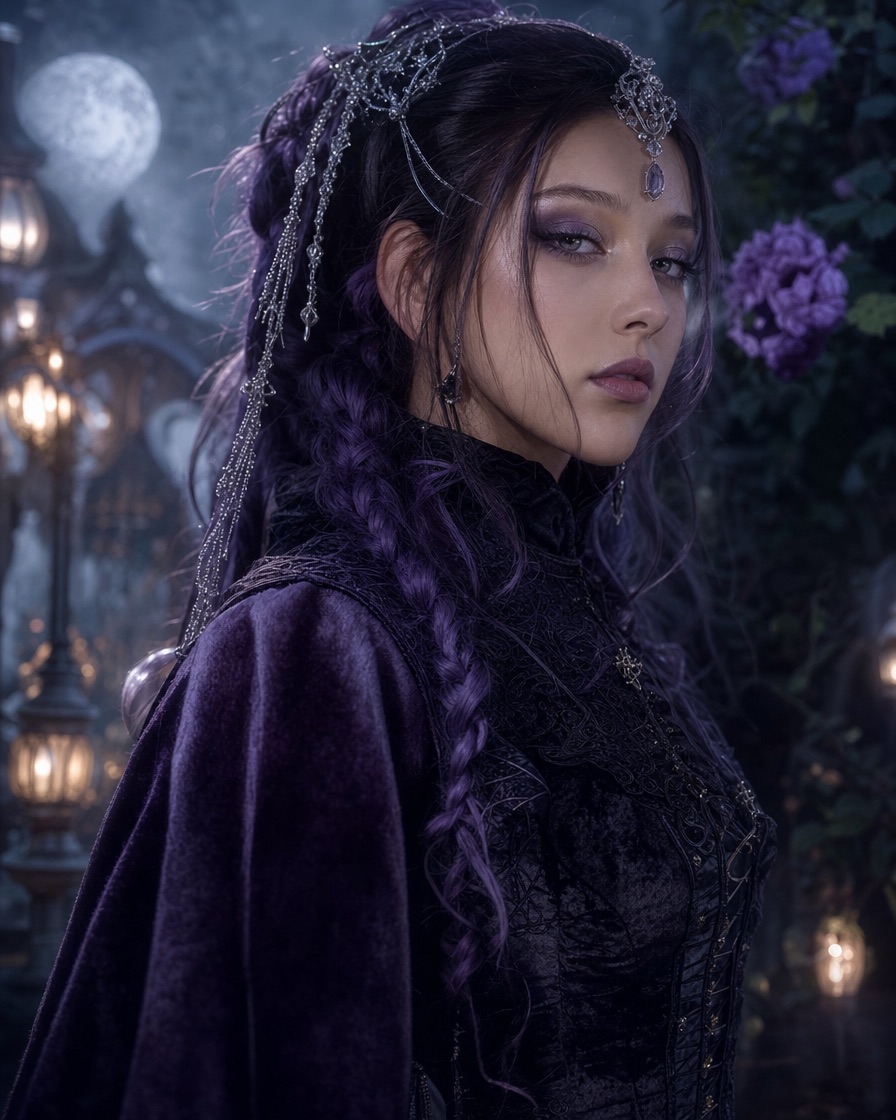
A 2026 Halloween trend roundup included a braided game character among its most-searched costume names. We are not reproducing that character. We are taking the visual idea that made the trend memorable: long, dark braids against a gothic silhouette, with small metallic highlights.
That idea works especially well in a ten-second video. Braids move when the head turns, silver jewellery catches the light, and a dark velvet outfit gives the frame weight. The look is legible without a complex scene.
The three parts of the look
A costume becomes a character when the details agree with each other. The midnight braids look has three parts.
The hair
Long braids in violet, deep blue or black. The colour should be dark enough to read as Halloween but distinct enough to separate from the background. Add two or three small silver cuffs or rings rather than covering the whole braid in metal.
If you are building the look in real life, a wig is easier than dyeing your own hair. Choose a lace-front wig with a realistic part and use a wide-tooth comb to separate the braids. For an AI video, you describe the braids and the model builds them.
The outfit
Black or deep purple velvet. A high collar, long sleeves with a lace cuff, or a corset-style waist. The fabric matters more than the cut: velvet absorbs light and creates soft shadows, which looks expensive on camera.
Avoid adding too many competing textures. If the hair is already detailed, keep the outfit relatively clean. A single lace cuff and a silver chain are enough.
The scene
A moonlit garden, a candlelit hall or a foggy Victorian room. The scene should be dark enough for the silver details to glow and simple enough that the braids remain the focus.
Warm lantern light and cool moonlight are a reliable combination. The warm light gives the skin a natural tone; the cool light separates the silhouette from the background.
Building the costume in real life
If you want to wear the look to a party, start with the hair. A long braided wig is the anchor. Choose a colour that matches your skin tone: violet works on most tones, deep blue is cooler, and black is the safest.
Next, find a dark velvet top or dress. Thrift stores and costume shops are better than fast-fashion sites for this because the fabric quality matters more than the exact cut. Look for a high collar or a sleeve you can pair with lace cuffs.
Finally, add silver. A chain necklace, a few rings, a hair cuff and a belt. Do not buy a full jewellery set; three small pieces are enough.
Makeup should stay cool and defined: a dark lip, a soft smoky eye and a little highlighter on the cheekbone. The braids are the statement; the makeup supports them.
The AI prompt recipe
If you want the look in motion, the Midnight Braids page opens the studio with a working prompt. The prompt follows the same five parts as every other look:
- Who: a fictional adult performer.
- What: long violet braids with silver hair jewellery, a black and purple velvet gothic costume with lace and metallic details.
- Where: a moonlit Victorian garden with soft fog, glowing lanterns and dark autumn foliage.
- Light: cinematic soft light, realistic fabric textures.
- Camera: a slow push-in, full body in frame.
The full prompt:
A fictional adult with long violet braids and silver hair accessories dances in a moonlit Victorian garden, black and purple velvet gothic costume, soft fog, slow camera push-in, cinematic editorial light, full body in frame, stable anatomy, no text, no watermark.
That prompt is a starting point. If the braids are too thin, add "thick, waist-length braids". If the garden is too busy, change it to a single candlelit hallway. Change one variable at a time.
Using your own photo
Image mode can keep your face while changing the hair and outfit. Upload a clear portrait with the face visible and the hair not covering the eyes. In the direction field, say:
Keep my face, skin tone and facial proportions. Change my hair to long violet braids with small silver cuffs. Dress me in a black velvet gothic costume with a lace collar. Place me in a moonlit garden with soft fog and warm lantern light.
The model may not reproduce an exact braid pattern. Treat the result as a styled interpretation. If the braids are the most important part, text mode gives the model more freedom and usually produces a cleaner silhouette.
What to avoid
Do not ask for a specific game or film character by name. Do not ask for a real person's face. Do not cover the face with a mask if you want the person to remain recognisable. And do not overload the prompt with five accessories; the braids need room to read.
If you are publishing the video, avoid using a franchise name in the caption in a way that implies an official collaboration. Describe the look as "midnight braids" or "gothic braids" instead.
Publishing the clip
The output is a silent 720p MP4 in a 9:16 frame. Add a dark, slow track from the platform's licensed library. A fast pop track fights the gothic mood; a low bass or a music-box melody works better.
Use the platform's AI-generated content label. Keep the caption short: the look, the scene and one line about how it was made. A long story in the caption is less effective than a clear visual.
If you make a series, keep the same braid colour and change the scene: garden, hallway, library. That builds a recognisable set without repeating the same clip.
Cost and preview
The first watermarked preview is free. It is a real generation, so you can judge the braids, the face and the motion before spending. Full MP4s start at $9.90 for one video; three are $19.90 and five are $29.90. The monthly plan is $29.90 for ten videos.
Failed generations return their reserved credits. One-time credits do not expire, so a pack can cover Halloween, Christmas and Valentine's content if you reuse the prompt structure.
Frequently asked questions
Is this a specific character costume?
No. It is an original gothic braided look inspired by a trend, not a reproduction of a game or film character.
Can I use my own photo?
Yes. Use image mode and ask the model to keep your face while changing the hair and outfit. Results vary by photo and by how specific the direction is.
What colour works best?
Violet and deep blue read well on dark backgrounds. Silver accessories add highlights that survive video compression. Black is the safest if you want a subtle look.
How long is the video?
About ten seconds, vertical 9:16, 720p and silent.
Can I make a still image instead?
Yes, for grading a photo you already have. The free browser photo editor applies a colour look but does not add a costume; for a new costume still, use an image model such as GPT Image 2 or Gemini. The AI studio is for motion.
Open the Midnight Braids page to start from the prompt, or browse the Halloween hub for other looks. The first preview is free.
Try the tool from this guide
One free watermarked preview per account. Full 720p MP4 after purchase. Failed generations return credits.
Make your Toc Toc AI dance video
Your photo guides the appearance. The source clip guides the hallway movement.
JPG, PNG or WebP · up to 10 MB
Choose a well-lit photo of one consenting adult. JPG, PNG or WebP; up to 10 MB.
Extra direction (optional)
Only selected results appear in our gallery after review. Your input remains private.
$9.90/ 1 video
50 credits · 10 secondsOne-time packs and subscriptions are available. Failed jobs return their credits.
Your videos
Upload a photo or describe a scene, then create your video.
Toc Toc AI
Toc Toc AI editorial team · Source and publishing references